Atlassian's New Meters Don't Bill Your Headcount. They Bill Your Configuration.
On December 3, 2026, Atlassian starts billing for usage beyond your included allowances. Two of the five meters are driven by what your Jira configuration does every hour of every day.
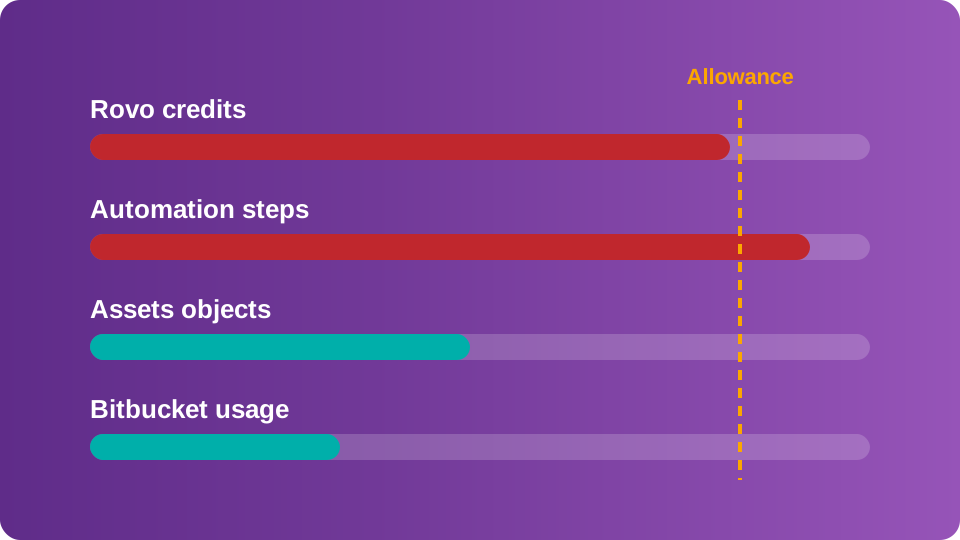
On December 3, 2026, Atlassian starts billing for usage beyond your included allowances on five metered capability areas.[1] Most of the coverage on the new metering so far treats these changes as a licensing story: "count your seats, cut the idle ones, move on".
That advice is correct and it is, also, incomplete.
Two of the five meters, automation steps and Rovo credits, are driven by what your Jira configuration does every hour of every day, whether or not a human is logged in. The businesses that get surprised in December by their bill will be caught by what they were not watching, rather than by the obvious historic usage.
So don't be surprised.
This blog covers what changed, what Atlassian's own billing documentation says that the announcement posts skipped, the honest math on seats versus allowances, and the six things worth doing in the weeks you have left to predict and prepare. Finally, we cover how Solcoro helps your business to prepare and achieve the best outcomes… in ways no other vendor can.
What Atlassian actually changed
Nothing was removed. Your seat subscription and renewal process are unchanged, and usage-based pricing adds a consumption layer on top of your plan.[2] Each metered capability ships with a monthly allowance included in your subscription, pooled at the organization level across all users and apps.[2] Consumption beyond that allowance becomes billable starting December 3, 2026 for most meters.[1]
These three structural facts matter more than the headline:
- The pool is organizational. Allowances from every subscription combine into one shared pool per meter. All usage across all your sites draws from it.[3]
- Nothing rolls over. Allowances refresh monthly, even on annual plans, and unused allowance is lost at the end of each month.[3]
- Enterprise loses unlimited automation. Enterprise plans previously had unlimited automation. They now receive pooled allowances like everyone else.[4]
That third point alone should change how Enterprise Jira admins and budget holders read the rest of this blog.
The five meters, and which ones your configurations control
Atlassian's own table lists five capability areas. Bitbucket is measured across four separate meters, so technically the count is eight.[5] Five is the grouping Atlassian uses, so it's the one Solcoro uses.
| Meter | What it counts | Driven by |
|---|---|---|
| Rovo credits | AI interactions: Rovo Chat, agents, Confluence slides, Jira coding agent, enriched Teamwork Graph calls | People and configuration |
| Automation steps | Every trigger, condition, action, branch and loop that executes in a flow | Configuration |
| Assets objects | Object records stored in your Assets schema | Configuration and integrations |
| Bitbucket usage | Pipeline build minutes, Git LFS storage, packages storage, packages network transfer | Engineering activity |
| CSM AI agent resolutions | Each closed interaction an AI agent resolves without escalating to a human | Customer volume |
The right-hand column is the point of this blog. Seat optimization only tells you how many people you pay for. It says nothing about the rules and AI features running in the background, the ones that run your business. Those are configuration questions, and configuration drives the two meters most Jira admins will hit first, or be bitten by first, if they're not prepared.
Three things the announcement posts skipped
Solcoro studied Atlassian's usage-based pricing FAQ, the automation billing documentation, the Rovo credits documentation, and the Jira pricing page individually and side by side. Three details stood out:
1. Extra usage is on by default. Atlassian's own pages disagree on this.
The Jira pricing page says Atlassian has committed to at least 90 days' notice and an explicit opt-in before charging beyond your allowance.[6] That's the line most people quote.
The usage-based pricing FAQ says something different: extra usage is enabled by default for most organizations, so charges may apply once included allowances and any purchased capacity are used.[7] The Rovo credits documentation repeats it: extra usage is on by default, and admins can set spending limits or disable it.[8]
Solcoro recommends you treat the billing documents as authoritative. They describe the setting in Atlassian Administration, and the setting is the thing that bills you. Go to Billing, open each meter, and look at what's actually toggled. Pro Tip: remember, if you want a hard cap, you set it. Nobody sets it for you.
2. A rule that fires and does nothing still costs your business.
Automation used to be measured in successful flow runs, per app, per edition.[4] It's now measured in steps, and Atlassian's billing doc is precise about what counts. A trigger execution is charged even when it finds no match and the rest of the flow never runs.[9] Steps are also charged when they abort, when they complete with business errors, and when they run but change nothing.[9]
Think about what that means for an instance that's been alive for five years. Every rule someone cloned for a second (and third, and fourth… and so on) project and forgot. Every "when issue created" rule scoped to a project that was archived in 2023. Each one fires on every matching event, every time, and each firing is at least one billable step. The rule does nothing useful and it still counts.
One caveat that cuts the other way: Rovo-powered steps inside a flow (Use Rovo, Use Agent) bill Rovo credits, not automation steps.[9] That's worse, not better. An AI action wired into a high-frequency trigger burns credits at Premium rates every time the trigger fires.
3. Sandbox counts, and you can't see automation by user.
AI interactions and automation steps in a sandbox draw from the same allowance as production, and the usage dashboard doesn't currently separate the two.[10] So the load-testing someone did on a new rule in sandbox, whenever, is in your number.
More important for governance… the Platform usage dashboard lets you filter by app or user, but user-level filtering is only available for Rovo credits.[11] For automation steps, you get an org-wide total and a 90-day history.[12] Atlassian's own notification documentation confirms the alerts are based on your business' pooled allowance, not on individual consumption.[13] When the 80% of available credits email from Atlassian lands with your billing admin or accounts payable, it won't say which rule, which project, or which team moved the number.
Seat optimization tells you how many people you pay for. It says nothing about the rules and AI features running in the background.
The honest math on seats and allowances
The objection you'll hear the moment you propose a license cleanup: "if we cut seats, we lose allowance." True. Your pool is the sum of per-user allowances across your subscriptions, so every seat you remove takes its credits and steps with it. The question is what that allowance is actually worth. Here's the complete picture at published rates, counting both meters a seat contributes to.
| Jira Standard | Jira Premium | |
|---|---|---|
| Seat price per user per month[14] | $7.91 | $14.54 |
| Automation steps per user per month[15] | 400 | 750 |
| Steps at $0.50 per 1,000[16] | $0.20 | $0.375 |
| Rovo credits per user per month[17] | 25 | 70 |
| Rovo credits at $0.01 each[8] | $0.25 | $0.70 |
| Allowance value per seat | $0.45 | $1.08 |
| Seat cost ÷ allowance value | approx. 18x | approx. 13.5x |
A Premium seat costs 13.5 times what its allowance is worth at overage rates. Keeping an idle seat to hoard credit allowance is one of the most expensive ways anyone has ever bought Rovo credits. Cut the genuinely idle seats.
What the seat math misses is the size of the allowances relative to actual use. On Jira Premium, a user gets 70 Rovo credits a month. A basic Rovo Chat message costs 10 credits.[18] That's seven quick answers, per person per month, before your business is drawing on the org-level pool. On Standard it's two and a half quick answers... Think Deeper, Confluence slides, agents with model selection and the Jira coding agent are all variable-cost Premium interactions,[18] which means a single curious power user can consume a dozen colleagues' allowances in an afternoon. The pool absorbs that, right up until it doesn't.
The Collection lever: same plan, ten times the credits
There's a second variable in the allowance math that most admins haven't priced. The allowance a seat carries depends on whether that seat is a standalone app or part of a Collection. Teamwork Collection and Service Collection seats carry 250 / 700 / 1,500 Rovo credits per user per month on Standard / Premium / Enterprise, against 25 / 70 / 150 for standalone Jira or Confluence on the same plan.[17] Atlassian's own phrasing is up to 10x. The automation side moves too: a Teamwork Collection seat carries 2,500 / 5,000 / 7,500 steps, against 400 / 750 / 1,000 for standalone Jira.[15]
| Per seat, per month, Premium plan | Standalone Jira | Teamwork Collection |
|---|---|---|
| Automation steps[15] | 750 | 5,000 |
| Rovo credits[17] | 70 | 700 |
| Basic Rovo Chat messages that buys[18] | 7 | 70 |
| Allowance value at overage rates | $1.08 | $9.50 |
Here Solcoro recommends considering two consequences on the Collections plan.
First, the seat-hoarding math changes: a standalone seat is a 13.5x overpay for its allowance, while a Collection seat carries nearly nine times the allowance value, so an idle Collection seat is a much closer call and deserves its own arithmetic before you cut that seat.
Second, and more useful: if an AI rollout is on your roadmap, closing the 630-credit gap per user at the $0.01 overage rate costs $6.30 a user a month, every month. Price that against the Collection uplift on your next renewal quote. For a lot of organizations the Collection is the cheaper way to buy the credits they were going to consume anyway, and it belongs in the licensing conversation long before it belongs in the overage conversation.
The seat-cleanup trap, done properly using Solcoro
Every industry post (before this one) about Atlassian's new pricing scheme ends the same way: reclaim your idle licenses. Correct. Here's where Solcoro brings its game.
Deactivating the wrong account breaks things. Filters owned by a deactivated user stop returning results for the dashboards built on them. Projects with a deactivated lead lose their default assignee. Automation flows run under a flow actor, and if that actor loses access, the flow fails.[19] None of this shows up in a license-optimizer report, because license optimizers look at login dates. They don't look at what the account holds.
This is the gap Solcoro's People Analysis was built for. Everyone else deletes users. Solcoro tells you what happens when you do.
People Analysis joins your organization's user directory to the configuration graph Solcoro already scans, so every user row carries two columns no seat-cleanup tool has: Owns (the filters, projects and other config objects that user owns) and Dependency weight (how much of your instance leans on them). Ten checks run against that join, including:
- Users inactive 30, 60 and 90 days with a billable seat, plus a Never-used Seats count for licenses that were provisioned and never opened once. That last one is the least arguable number in the product.
- Inactive user with high dependencies. Dormant, and the configuration graph leans on them. These are the accounts you deactivate last, after reassigning what they own.
- Inactive admin, oversized admin groups and direct user grants in permission schemes, the three ways privilege sprawls quietly.
- Config object with inactive owner, 60+ days. Predictive. It catches the breakage before the deactivation causes it.
Solcoro is read-only. It will never deactivate anyone. It gives you the list, ranked by what's safe to reclaim and what needs a hand-off first, and it re-runs on every scan so the list stays current after the cleanup. Pair it with whatever you use to execute the deactivation. The sequencing is what matters: know the dependencies, then cut.
What to do before December 3
The good news is you have some time. Preparing ahead of time per Solcoro Best Practices follows these steps:
- Open Atlassian Administration → Billing and check the extra usage toggle on each meter. It's on by default.[7] Decide, per meter, whether you want uncapped billing, a spending limit, or a hard stop. Then confirm who receives the 80% and 100% alerts, because the pool won't assign an owner for you.
- Pull your 90-day usage history now, while it's free to be wrong.[12] A baseline taken in September is worth more than an estimate taken in December. Export the Rovo credits CSV too. It includes feature, user and timestamp per event.[20]
- Inventory your automation rules for orphans, clones and broad triggers. Any rule on a global "issue created" or "issue updated" trigger fires on every event in scope, matched or not.[9] Scope them down or disable them. If a rule contains a Rovo step, estimate its monthly fire count and multiply by 10 before you decide whether it stays.
- Map where AI is enabled, not just where it's used. Rovo agents wired into automation, self-service agents in JSM help centers, Create with Rovo in Confluence. These consume credits on behalf of users who never opened Rovo Chat. If the map says AI is going wide, price the Collection before you price the overage. Solcoro helps you identify which Workflow has AI Agent activity tied to them.
- Run the seat cleanup with dependencies in view. Reclaim never-used and 90-day-dormant seats first. For every dormant account that owns filters, projects or admin rights, reassign before you deactivate. That's the step Solcoro People Analysis exists to make fast.
- Set a configuration baseline and watch the delta. Automation steps have no per-user attribution and no per-rule attribution in Atlassian's dashboard.[11] The only way to answer "what started consuming steps last Tuesday" is to know what your configuration looked like last Monday. Solcoro's Gold Scan baseline, Drift and Change History give you that, delivered to Slack, Teams or email when something moves.
Use Solcoro for Jira to inspect your Cloud instance now and save HOURS of forensic review. Save peace of mind knowing what actions to take, in order of priority.
FAQ
As of September 2026 and subject to Atlassian changes.
Is Atlassian raising per-seat prices?
No. The seat layer is unchanged.[2] What's new is a usage layer on five metered capability areas, billed beyond an included monthly allowance from December 3, 2026.[1]
Will I be charged automatically?
For most organizations, yes, if you exceed your allowance. Extra usage is enabled by default.[7] Organization and billing admins get notified at 80% and 100%, and can set spending limits or disable extra usage per meter at any time.[13]
Which meter will Jira teams hit first?
Rovo credits, because the per-user allowances on standalone Jira are small (25 on Standard, 70 on Premium)[17] and Premium AI features are variable-cost. Automation steps are the sleeper. They scale with configuration sprawl rather than deliberate adoption, and Enterprise no longer has unlimited automation.[4]
Does cutting idle seats reduce my allowance?
Yes. Allowances are the sum of per-user allowances across your subscriptions. A standalone Jira Premium seat contributes 750 steps and 70 credits, worth about $1.08 a month at overage rates, against a $14.54 seat. A Teamwork Collection Premium seat contributes 5,000 steps and 700 credits, about $9.50.[17] Reclaim the idle ones, do the arithmetic for your actual subscription, and check what they own before you do.
Does a smaller team automatically pay less?
No. Consumption is driven by rules and AI features, not headcount. A lean team with a broad, ungoverned automation footprint can consume more than a large team with a clean configuration.
Solcoro scans, scores and monitors your Jira Cloud configuration from the outside. Read-only, metadata-only, no plugin in your instance. People Analysis is included with every Solcoro for Jira install. Start with a free scan on the Atlassian Marketplace and see your never-used seats, your dormant admins and what each of them owns before December 3.
Sources
- Atlassian, Usage-based pricing FAQ, "When does usage-based pricing take effect": billing begins December 3, 2026 for most meters.
- Atlassian, Usage-based pricing FAQ, "Does usage-based pricing replace my current subscription?"
- Atlassian, Usage-based pricing FAQ, "How does allowance sharing work across my organization?"
- Atlassian, Automation FAQ, "What is changing from how Automation usage worked before?"
- Atlassian, Usage-based pricing FAQ, "Which meters are included in usage-based pricing?"
- Atlassian, Jira pricing page, "Who can use Rovo AI in Jira?"
- Atlassian, Usage-based pricing FAQ, "Is extra usage enabled by default for my organization?"
- Atlassian Support, How Rovo credits work, "What to expect if you go over your credit allowance."
- Atlassian Support, How is your automation usage calculated, "What counts as an automation step?"
- Atlassian, Usage-based pricing FAQ, "Does sandbox usage count towards my allowance?"
- Atlassian, Usage-based pricing FAQ, "Where can I monitor and manage usage?"
- Atlassian, Usage-based pricing FAQ, "Can I forecast what my costs will be?"
- Atlassian, Usage-based pricing FAQ, "Who receives usage notifications and how are they delivered?"
- Atlassian, Jira pricing page, Standard and Premium per-user monthly rates.
- Atlassian Support, How is your automation usage calculated, "What are my automation step allowances?" (standalone and Teamwork Collection figures).
- Atlassian, Automation FAQ, "How much does extra usage cost?"
- Atlassian Support, How Rovo credits work, "Included Rovo credit allowances" (standalone and Collection figures).
- Atlassian Support, How Rovo credits work, "What consumes Rovo credits," pricing table effective August 31, 2026.
- Atlassian Support, What is a flow actor?
- Atlassian Support, How Rovo credits work, "Export usage data."